

- By admin
- August 21, 2026
- Comment Off
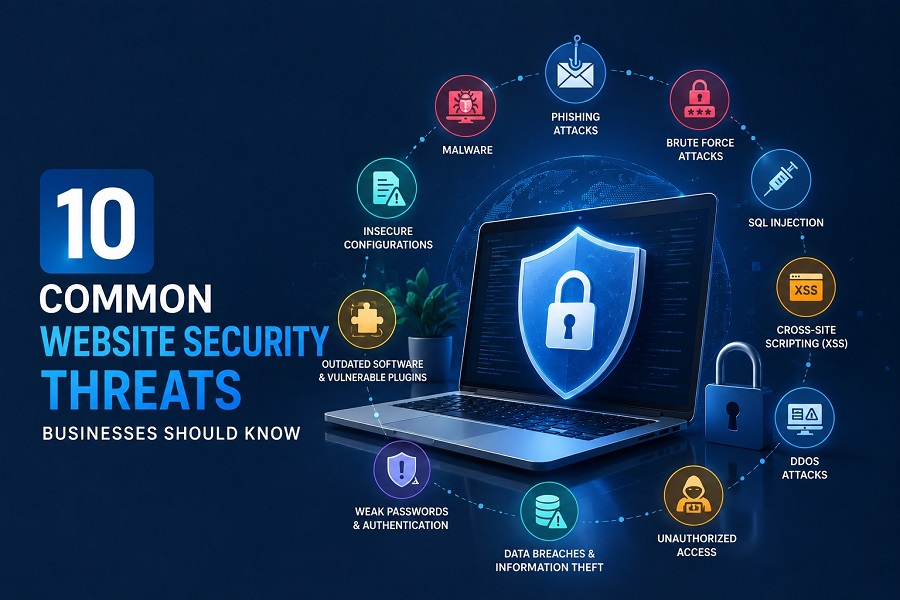
Your website is often the first place customers interact with your business. It may collect contact details, process payments, store customer accounts, publish important business information, or connect with other online systems. That makes Website Security an essential part of running a modern business—not something to think about only after an attack occurs. Understanding 10 Common Website Security Threats can help you identify potential risks and protect your website before an attack occurs.
From malware and phishing to weak passwords and outdated software, there are numerous website security threats for businesses that can affect websites of every size. Small businesses can be particularly attractive targets because their websites may not have the same security resources as larger organizations.
Understanding the most common website security threats is the first step toward protecting your website, customers, and reputation.
Why is Website Security Important for Businesses?
Before looking at individual threats, it is important to understand why website security is important for businesses.
A compromised website can lead to stolen information, unexpected downtime, damaged search visibility, financial losses, and loss of customer trust. In some cases, attackers may use a hacked website to distribute malware, redirect visitors, steal login credentials, or damage the site’s content.
Good business website security combines several layers of protection, including secure hosting, software updates, strong authentication, backups, monitoring, encryption, and regular security checks.
Here are 10 common website security risks every business should understand.
1. Malware and Malicious Code
Website malware is one of the most common threats businesses face. Malware is malicious software or code that can be inserted into a website or its underlying systems without the owner’s permission.
A malware infection may cause unusual redirects, unwanted advertisements, suspicious pop-ups, unauthorized content, or unexpected changes to website files.
Attackers may also use compromised websites to distribute malware to visitors.
How to prevent website malware?
Businesses should regularly update their CMS, themes, plugins, and server software. Regular backups, malware scanning, secure hosting, firewalls, and website security monitoring can also help identify suspicious activity.
If you notice unexpected changes to your website, investigate them immediately rather than assuming they are harmless technical errors.
What is an SSL Certificate and Why Does Your Website Need One?
2. Phishing Attacks
Phishing attacks attempt to trick people into revealing sensitive information such as passwords, payment details, or account credentials.
Although phishing often happens through email or messaging platforms, compromised websites can also be used as part of phishing campaigns. An attacker may create a fake login page that looks similar to a legitimate business website.
This is why phishing and website security are closely connected.
How to prevent phishing attacks?
Businesses should educate employees about suspicious links and login requests, use strong authentication, maintain HTTPS, and monitor their websites for unauthorized pages.
Customers should also be encouraged to access important services through the company’s official website rather than unfamiliar links.
3. Brute-Force Attacks
A brute-force attack involves repeatedly attempting to guess usernames and passwords until the attacker gains access.
Websites with weak administrator passwords, exposed login pages, or poor authentication controls can be vulnerable to these attacks.
For businesses, website login security should be treated as a priority because administrator accounts can provide attackers with extensive control over website content and settings.
How to prevent brute-force attacks?
Use strong, unique passwords and enable two-factor authentication wherever possible. Login rate limiting, account lockouts, security plugins, firewalls, and monitoring can also help reduce the risk.
Businesses should regularly review administrator accounts and remove accounts that are no longer required.
4. SQL Injection Attacks
SQL injection attacks target websites and applications that interact with databases.
If an application does not properly validate and handle user input, attackers may attempt to insert malicious database commands. A successful attack could potentially expose, modify, or delete information stored in a database.
This makes SQL injection an important web application security threat for businesses operating websites with customer accounts, forms, databases, or ecommerce functionality.
How to prevent SQL injection?
Developers should use secure coding practices, parameterized queries, proper input validation, least-privilege database permissions, and regular security testing.
Keeping website applications and frameworks updated can also help address known vulnerabilities.
5. Cross-Site Scripting (XSS)
Cross-site scripting, commonly called XSS, is another important website security vulnerability.
XSS attacks can occur when a website allows untrusted content to be inserted into pages without proper validation or protection. Attackers may attempt to inject malicious scripts that execute in a visitor’s browser.
Depending on the vulnerability, this could potentially be used to steal information, manipulate page content, or perform unauthorized actions.
How to prevent XSS attacks?
Developers should properly validate and sanitize user input, encode output, use appropriate security headers, and follow secure development practices.
Regular website vulnerability scanning can also help identify potential weaknesses before attackers exploit them.
6. DDoS Attacks
A DDoS attack—Distributed Denial-of-Service attack—attempts to overwhelm a website or server with large amounts of traffic or requests.
When successful, a DDoS attack can make a website extremely slow or completely unavailable to legitimate visitors.
For businesses, this can result in lost sales, missed enquiries, frustrated customers, and downtime.
How to protect a website from DDoS attacks?
DDoS protection for businesses can include traffic filtering, firewalls, content delivery networks, rate limiting, monitoring, and specialized DDoS protection services.
Reliable Web Hosting infrastructure can also play an important role in maintaining availability during traffic spikes and attacks.
7. Outdated Software and Vulnerable Plugins
One of the easiest security problems to overlook is outdated website software.
CMS platforms, plugins, themes, extensions, and server software may contain security vulnerabilities. Once a vulnerability becomes publicly known, attackers may actively search for websites running affected versions.
This is particularly relevant to WordPress websites because websites often use multiple plugins and third-party themes.
How to improve website security?
Keep your CMS, plugins, themes, libraries, and server software updated. Remove unused plugins and themes instead of leaving them installed.
Website plugin security should be part of routine website maintenance. Businesses should also review whether each plugin comes from a reputable developer and is still actively maintained.
8. Weak Passwords and Poor Authentication
Weak passwords remain a major cybersecurity problem.
Simple passwords, reused credentials, shared administrator accounts, and missing multi-factor authentication can make it easier for attackers to gain unauthorized access.
Website password security should cover administrators, employees, hosting accounts, databases, email accounts, and other systems connected to your website.
Protect your website login
Use long and unique passwords, password managers, multi-factor authentication, and role-based access controls.
Two-factor authentication adds another layer of protection because an attacker needs more than just a password to access the account.
Businesses should also regularly review who has administrative access to their website.
9. Data Breaches and Customer Information Theft
Businesses that collect customer information have an important responsibility to protect it.
A website data breach may expose information such as names, email addresses, passwords, contact details, account information, or other sensitive data.
The consequences can extend beyond the technical problem. Customers may lose confidence in the business, while the organization may face financial, operational, and regulatory consequences depending on the situation.
How to protect customer information?
Use HTTPS, secure databases, strong authentication, access controls, encryption where appropriate, secure hosting, regular updates, and reliable backups.
Customer data security should be considered throughout the entire website and application environment—not only on the checkout page.
10. Unauthorized Access and Website Hacking
Website hacking can happen when attackers exploit vulnerabilities, stolen credentials, insecure plugins, weak passwords, or compromised hosting accounts.
Once inside, attackers may change website content, create unauthorized administrator accounts, install malware, redirect visitors, or steal information.
One of the most obvious signs of a hacked website is unexpected content or behavior. However, some attacks are deliberately designed to remain hidden.
What to do if your website is hacked
If you suspect that your website has been compromised, avoid ignoring the warning signs. Take the affected systems offline where appropriate, change compromised credentials, identify the source of the intrusion, restore from a clean backup if necessary, and investigate the affected files and accounts.
Professional website security solutions can also help businesses with malware removal, vulnerability scanning, monitoring, and ongoing protection.
Website Security Best Practices for Businesses
Understanding common website security threats is useful, but prevention requires ongoing effort.
A strong website security checklist for businesses should include:
- Keep website software and plugins updated.
- Use strong, unique passwords.
- Enable multi-factor authentication.
- Install and maintain an SSL certificate.
- Use HTTPS across the entire website.
- Maintain regular, secure website backups.
- Monitor the website for suspicious activity.
- Scan regularly for malware and vulnerabilities.
- Remove unnecessary plugins, themes, and user accounts.
- Use secure and reliable hosting.
- Protect administrator and hosting accounts.
- Keep security software and firewalls properly configured.
- Review website permissions regularly.
- Create a plan for responding to security incidents.
These website security best practices for businesses can significantly improve your overall security posture.
Website Security for Small Businesses
Website security for small businesses deserves particular attention because smaller organizations may assume that hackers only target large companies.
In reality, automated attacks can scan thousands of websites looking for known vulnerabilities, weak passwords, outdated software, and exposed login pages.
Small businesses don’t necessarily need an overly complicated security system. They do need consistent basic protection.
A combination of secure Web Hosting, SSL/HTTPS, strong passwords, software updates, backups, monitoring, and regular security checks can provide a much stronger foundation.
Final Thoughts
The internet provides businesses with incredible opportunities, but it also introduces significant security risks. Common website security threats such as malware, phishing, brute-force attacks, SQL injection, XSS, DDoS attacks, outdated software, weak passwords, data breaches, and unauthorized access can affect organizations across almost every industry.
The good news is that website security does not have to be complicated. Businesses can significantly reduce their exposure by keeping software updated, protecting administrator accounts, using HTTPS, maintaining backups, monitoring websites, and regularly checking for vulnerabilities.
Most importantly, Website Security should be treated as an ongoing process rather than a one-time task. As your website, technology, and business grow, your security practices should grow with them.
A secure website protects more than files and servers—it helps protect your customers, reputation, business operations, and long-term online presence.